ERP System Integration Services for Small Businesses [Connect Your Business Software Without the Chaos]
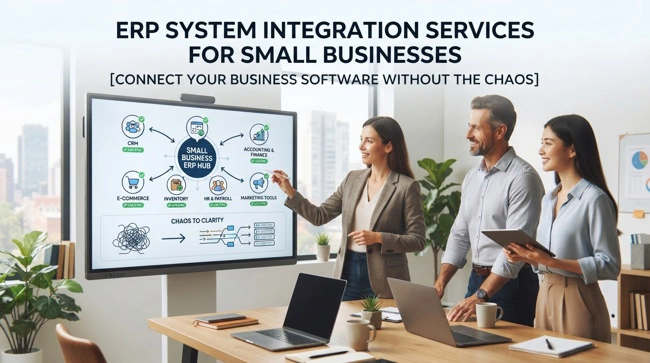
Running a growing business often means adding software one tool at a time. You may have accounting software for finances, a POS system for sales, a CRM for customers, an e-commerce platform for online orders, and spreadsheets filling the gaps between them. The problem is that these systems do not always communicate with each other. ERP system integration services can help bring those disconnected tools together so information moves between systems more reliably and your team spends less time copying data from one place to another.
The goal of ERP integration is not simply to connect software, but technology makes it possible. A successful integration should make everyday work easier, reduce duplicate data entry, improve data accuracy, and give business owners a clearer picture of what is happening across the company. For a small or mid-sized business, that can mean knowing what has sold, what is in stock, what customers owe, what needs to be purchased, and how the business is performing without pulling information from five different applications.
This guide explains how ERP system integration services work, which systems businesses commonly connect, what the implementation process looks like, what integration can cost, and how to avoid some of the mistakes that make software projects unnecessarily difficult. If your business has outgrown spreadsheets or relies on several applications that were never designed to work together, read on to understand what a practical integration strategy should look like.
What Are ERP System Integration Services?
ERP system integration services involve connecting an enterprise resource planning system with other software applications, databases, platforms, and business tools so they can exchange information and support connected workflows. Instead of treating every application as a separate island, integration creates a flow of information between systems that need to work together.
For example, a retail business might process a sale through its POS system. Without integration, an employee may have to manually update inventory and accounting records afterward. With a properly designed integration, sales information can move automatically into the ERP, inventory quantities can be updated, and relevant financial information can be made available to the accounting system.
The exact setup depends on the business. Some companies need a relatively simple connection between an ERP and accounting software, while others require several integrations involving e-commerce, CRM, inventory, payment processing, shipping, payroll, or specialized industry applications. This is why good integration starts with understanding the business process rather than simply asking which applications can be connected.
Why Small Businesses Need ERP Integration
Small businesses often reach a point where adding another application seems easier than replacing an existing system. At first, this approach can work. A company might use QuickBooks for accounting, Shopify for online sales, a spreadsheet for inventory, and a CRM for customer information. Each tool solves a specific problem, so there is little reason to replace everything immediately.
The difficulty appears when the business grows. More transactions mean more information must be transferred between systems, and manual processes that once took 10 minutes a day can eventually consume hours. Employees may enter the same customer, product, or order information multiple times, creating opportunities for inconsistencies and errors.
ERP integration addresses this problem by creating a more connected operational environment. Instead of asking employees to become human data-transfer systems, the business can automate appropriate information flows and give employees more time to focus on customers, operations, sales, and decision-making.
This becomes particularly important when a business has multiple locations, sales channels, warehouses, or departments. A disconnected technology environment becomes increasingly difficult to manage as complexity grows.
ERP System Integration and Business Process Improvement

One of the biggest mistakes businesses make is assuming that integration is purely a technical project. It is not. The technology matters, but the business process matters just as much.
Suppose a company currently receives an online order, prints it, enters it into another system, adjusts inventory manually, sends information to accounting, and then updates the customer record. Connecting all the applications without examining the workflow may simply automate a poorly designed process.
A better approach is to first map how information moves through the organization. Where does an order originate? Which system should be the source of truth? When should inventory change? Which system owns customer information? When should accounting receive transaction data? Who needs access to the information?
Once these questions are answered, the integration can be designed around the desired workflow. This approach aligns closely with business process consulting, where technology decisions are based on how the organization actually operates rather than on software features alone.
Which Business Systems Can an ERP Connect?
Modern ERP platforms can potentially connect with many types of business applications. The specific possibilities depend on the ERP, the third-party application, available APIs, data formats, security requirements, and the complexity of the workflow.
| Business System | Common Integration Purpose |
|---|---|
| POS systems | Synchronize sales, products, customers, and inventory |
| Accounting software | Transfer financial transactions and reporting data |
| CRM platforms | Share customer, sales, and account information |
| E-commerce platforms | Connect orders, products, customers, and inventory |
| Payment gateways | Transfer transaction and payment information |
| Inventory systems | Synchronize stock levels, products, and warehouse data |
| Shipping platforms | Move order, fulfillment, and tracking information |
| Payroll systems | Connect employee and payroll-related information |
| Business intelligence tools | Deliver operational data for reporting and analysis |
The important point is that integration should have a clear business purpose. Connecting every application simply because a connector exists can create unnecessary complexity. A practical ERP environment connects systems where the flow of information produces a measurable operational benefit.
ERP Integration With Accounting Software
Accounting is one of the most common areas for ERP integration because financial information touches almost every part of a business. Sales, purchases, inventory, expenses, invoices, payments, and refunds can all influence financial records.
An integrated environment can reduce the amount of information employees have to enter manually. For instance, sales information generated by a POS or e-commerce platform can be passed into the appropriate financial workflow, while purchasing information can support accounts payable and inventory management.
This does not necessarily mean the ERP should replace an existing accounting platform. In many cases, businesses can continue using familiar accounting software while connecting it to their operational systems. The objective is to establish a reliable flow of information and clearly define which system owns each type of data.
Connecting ERP With POS and Inventory Systems
For retail businesses, POS and inventory integration can have an especially visible impact. Every sale affects inventory, revenue, product availability, and potentially purchasing decisions. When those systems are disconnected, employees may have to reconcile information manually at the end of the day.
With integration, sales information can flow from the POS into the ERP while inventory records are updated according to the defined workflow. Managers can then use centralized information to understand which products are moving, where stock levels are changing, and when replenishment may be required.
The same principle applies to businesses operating multiple locations. Instead of maintaining completely separate spreadsheets or manually combining reports from each store, an integrated environment can provide a more consistent view of operations.
ERP and E-Commerce Integration

E-commerce has created another major integration challenge for growing businesses. Online stores generate product, order, customer, payment, and fulfillment information that often needs to be shared with back-office systems.
Without integration, an employee may download orders from an online store and manually enter them into another system. This approach becomes increasingly difficult as order volume increases. It also creates opportunities for incorrect product quantities, duplicate customer records, delayed fulfillment, and inaccurate inventory information.
ERP and e-commerce integration can help establish a more consistent flow from online order to fulfillment and reporting. The right design depends on the business, but the broader objective remains the same: eliminate unnecessary manual transfers while keeping important systems synchronized.
The ERP System Integration Process
A professional ERP integration project should be structured rather than treated as a quick technical connection. The first stage is discovery. This involves understanding the company's current software environment, workflows, pain points, data sources, and desired outcomes.
The next stage is integration planning. This is where the implementation team determines which systems need to communicate, what information should move between them, how frequently it should move, and which application should be considered the source of truth for specific data.
After planning comes configuration and development. Depending on the project, this could involve native connectors, APIs, middleware, custom integration software, webhooks, database connections, or a combination of approaches. The technical solution should match the business requirement rather than forcing the business into an unnecessarily complicated architecture.
Testing follows development. Data should be tested under realistic conditions, including normal transactions, failed transactions, duplicate records, missing information, and unusual scenarios. Testing is particularly important because an integration can appear to work while quietly creating incorrect data.
Finally, the system is deployed and monitored. Employees should understand the new workflow, documentation should be available, and the integration should be reviewed after launch to identify problems that only become visible during real-world use.
Common ERP Integration Mistakes to Avoid
A successful integration is less about connecting the largest number of systems and more about connecting the right systems correctly. One common mistake is starting with technology instead of business requirements. Businesses sometimes purchase connectors or integration tools before deciding what information actually needs to move and why.
Another problem is poor data quality. If customer records contain inconsistent names, duplicate accounts, missing information, or different product codes across systems, integration can move those problems faster rather than solving them. Data cleanup should therefore be part of the implementation conversation.
Businesses should also avoid underestimating employee adoption. A technically successful integration can still fail if employees do not understand how their responsibilities have changed. Training should focus on the actual work employees perform rather than overwhelming them with technical explanations.
Finally, businesses should not assume that an integration is a "set it and forget it" project. APIs change, applications are updated, credentials expire, and business processes evolve. Ongoing monitoring and support can help ensure that the integration continues to deliver value.
How Much Do ERP System Integration Services Cost?
There is no single price for ERP system integration services because integration projects vary significantly in scope. A simple connection between two systems may be relatively straightforward, while a multi-system environment involving custom workflows, complex data transformations, and several APIs can require considerably more planning and development.
The main factors affecting cost include the number of systems being connected, the complexity of the workflows, data migration requirements, customization, security requirements, testing, reporting needs, and ongoing support.
For a small business, the most sensible approach is not necessarily to pursue the cheapest integration. It is to identify the workflows where integration will produce the greatest operational improvement and prioritize those first. A focused implementation can provide meaningful results without forcing the business into a massive technology project.
Choosing the Right ERP Integration Partner

The right integration partner should understand both software and business operations. Technical skills are important, but a developer who can build an API connection is not automatically the right person to determine which data should move between systems or how a workflow should operate.
Look for a provider that asks questions about your current processes, existing software, employees, customers, reporting requirements, and future growth. They should be willing to explain technical decisions in plain language and identify situations where integration may not actually be necessary.
A strong partner should also understand custom software development, API integration, data security, testing, documentation, and ongoing support. More importantly, the provider should be comfortable telling you when a simpler solution makes more sense than an expensive custom build.
ERP Integration vs. Replacing Your Existing Software
Businesses sometimes assume that disconnected systems mean they need to replace everything. That is not always true. In some cases, integration can extend the useful life of existing software while creating a more connected operating environment.
Replacement may make sense when existing applications are outdated, unsupported, severely limited, or fundamentally incompatible with the company's future requirements. Integration may be more appropriate when individual systems work well but simply do not share information effectively.
The decision should therefore be based on the total business picture. Consider licensing costs, migration risks, employee training, operational disruption, data quality, scalability, and the long-term technology roadmap before deciding whether to integrate, replace, or gradually modernize systems.
How ERP Integration Supports Business Growth
A good ERP integration strategy should not only solve today's problems. It should create a foundation that can support tomorrow's growth. A company that expects to add locations, sales channels, employees, products, or services should consider those possibilities during the planning stage.
Connected systems can make growth easier because employees do not have to create entirely new manual processes every time the business expands. Centralized information can also give owners better visibility into operations, allowing them to make decisions based on current data rather than fragmented reports.
This is particularly valuable for businesses moving from informal processes into more structured operations. When the company reaches the stage where spreadsheets, email, and disconnected applications are becoming difficult to manage, a properly integrated ERP environment can provide the structure needed to move forward.
What a Practical ERP Integration Strategy Looks Like

The best ERP integration strategy is usually the one employees barely notice because it removes unnecessary work rather than adding another layer of complexity. It starts with a clear understanding of the business, identifies the most important information flows, and prioritizes integrations that solve genuine operational problems.
For one business, that may mean connecting a POS system to inventory and accounting. For another, it could mean integrating an e-commerce platform with fulfillment and customer management. A professional services company might prioritize CRM, invoicing, project management, and reporting.
Praxis Blueprint approaches business systems from this practical perspective. Its ERP, POS, CMS, integration, and consulting capabilities are designed around the idea that software should fit the way a business operates rather than forcing business owners to adapt unnecessarily to complicated technology. That philosophy is particularly relevant for small and mid-sized companies that need useful systems without enterprise-level complexity.
FAQs: ERP System Integration Services
What are ERP system integration services?
ERP system integration services connect an ERP platform with other business applications so information can move between systems. Common integrations include accounting, POS, CRM, e-commerce, inventory, payment, and reporting platforms.
Why is ERP integration important for small businesses?
ERP integration can reduce duplicate data entry, improve information accuracy, streamline workflows, and provide better visibility across business operations. These benefits become increasingly important as a company grows.
Can an ERP integrate with QuickBooks?
Yes, an ERP can often integrate with QuickBooks or other accounting platforms, depending on the specific systems and available integration methods. The integration can help transfer relevant financial and operational information between the platforms.
How long does ERP integration take?
The timeline depends on the number of systems, data complexity, customization, testing requirements, and business processes involved. A simple integration can be relatively quick, while a multi-system implementation may require substantially more planning and development.
Is ERP integration better than replacing software?
Not necessarily. Integration can be a practical alternative when existing applications work well but are disconnected. Replacement may be more appropriate when the current systems are outdated, unsupported, or unable to meet the company's long-term requirements.
What should I look for in an ERP integration company?
Look for a provider with experience in ERP implementation, APIs, system integration, data management, testing, business process analysis, and ongoing support. The provider should also be able to explain technical decisions clearly and focus on measurable business outcomes.
Build a Connected Business System That Actually Works
ERP integration should ultimately be about making the business easier to run. When information moves reliably between the systems employees already use, teams can spend less time reconciling spreadsheets and more time doing productive work. Owners also gain a clearer view of operations without constantly assembling information from disconnected sources.
The strongest projects begin with business needs, not technology for its own sake. They identify the processes causing the most friction, clean up the underlying data, define how systems should communicate, test the workflows carefully, and provide support after implementation. That approach makes ERP system integration services a business improvement strategy rather than simply another IT project.
For small and mid-sized businesses, the opportunity is significant. You do not necessarily need dozens of applications or a huge enterprise platform. You need systems that work together, information you can trust, and technology that supports the way your business actually operates. When those pieces are designed properly, ERP integration can turn disconnected software into a more coherent foundation for growth.