Small Business ERP Software Implementation Services: A Practical Guide to Getting Your New System
Choosing an ERP system is a major decision for a small or growing business, but buying the software is only the beginning. The real value comes from implementing it correctly so that the system supports the way your business actually operates. A poorly planned implementation can leave employees frustrated, create unnecessary costs, and simply replace one set of disconnected processes with another.
A well-planned implementation, on the other hand, can bring inventory, purchasing, sales, reporting, accounting, and other business processes into a more connected environment.
For entrepreneurs and small-to-mid-sized businesses, small business ERP software implementation services can provide the practical expertise needed to move from spreadsheets, disconnected applications, and manual processes to a system that is easier to manage and scale. Praxis Blueprint takes this practical approach to business systems, focusing on solutions that fit the business rather than forcing the business to adapt to unnecessarily complicated software.
What Are Small Business ERP Software Implementation Services?
Small business ERP software implementation services involve the planning, configuration, integration, data migration, testing, training, deployment, and ongoing support required to put an ERP system into practical use. An ERP, or enterprise resource planning system, brings important business processes into an integrated environment so information can move more efficiently between different areas of the company.
For a small business, implementation should be about more than turning on software features. The project should begin by understanding how the company currently works, where employees lose time, which processes create errors, what information management needs to make decisions, and which systems need to communicate with the new ERP.
This distinction matters because every business has its own workflows. A retail company may be primarily concerned with inventory, purchasing, sales, and accounting. A growing service company may need job tracking, scheduling, invoicing, reporting, and customer information. A multi-location business may need centralized reporting and consistent processes across several locations.
The best ERP implementation therefore starts with the business problem rather than a generic feature checklist. Current ERP implementation guidance similarly emphasizes defining business outcomes, documenting requirements, cleaning data, testing real workflows, training users, and controlling project scope.
Why Small Businesses Need a Different ERP Implementation Approach
ERP software is often associated with large corporations, complex projects, and expensive technology departments. Small businesses have different realities. A company with 10, 25, or 100 employees may not have a dedicated IT department or a full-time project manager available to manage a software rollout.
That does not mean the business cannot benefit from ERP technology. It means the implementation needs to be practical and appropriately scaled.
For a small business, the goal should not be to implement every available module on day one. Instead, the company should identify the operational problems that matter most and build the implementation around them. Starting with the highest-value processes can make the project easier to manage while giving employees a clear reason to adopt the new system.
This is particularly important for businesses moving away from spreadsheets. If employees have spent years maintaining spreadsheets for inventory, purchasing, customer information, or reporting, simply giving them new software will not automatically solve the underlying problems. The implementation needs to address the workflow itself.
When Is It Time to Implement an ERP System?
Many businesses reach a point where their existing tools become difficult to manage. A company might start with spreadsheets and a few standalone applications because those tools are inexpensive and easy to understand. As sales increase and operations become more complicated, however, the same approach can create bottlenecks.
You may be ready to consider an ERP implementation if employees repeatedly enter the same information into multiple systems, managers struggle to obtain accurate reports, inventory information is difficult to trust, or employees spend significant amounts of time reconciling data between applications.
Other warning signs include increasing difficulty managing multiple locations, inconsistent business processes, slow month-end reporting, growing administrative workloads, and uncertainty about which numbers are accurate.
If these problems sound familiar, our planned "How to Replace Spreadsheets With ERP Software" article would be a useful internal resource to link here. It can help readers understand whether the problem is simply spreadsheet organization or whether the business has reached the point where a more integrated system makes sense.
What Does an ERP Implementation Actually Include?
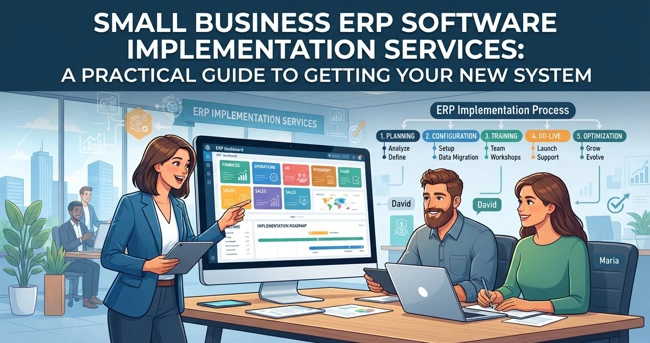
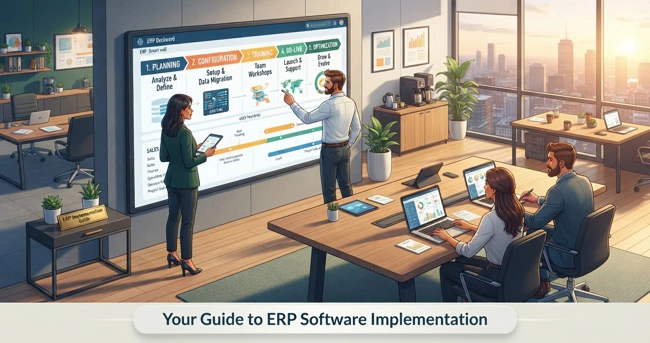
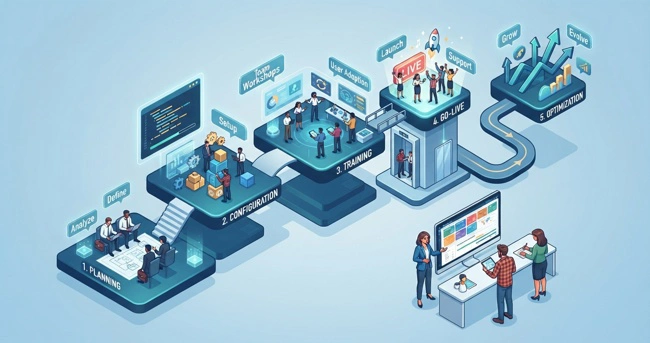
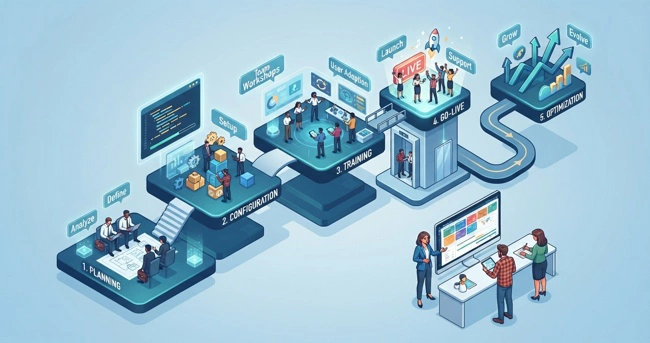
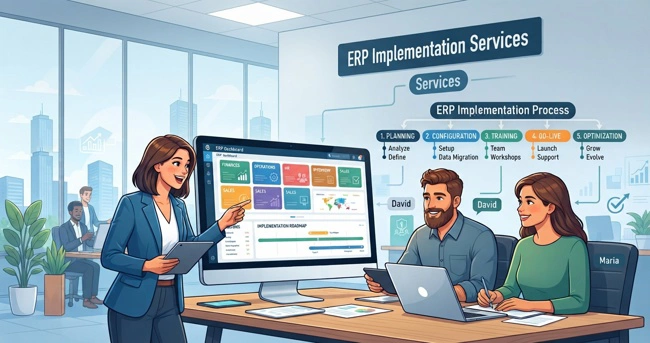
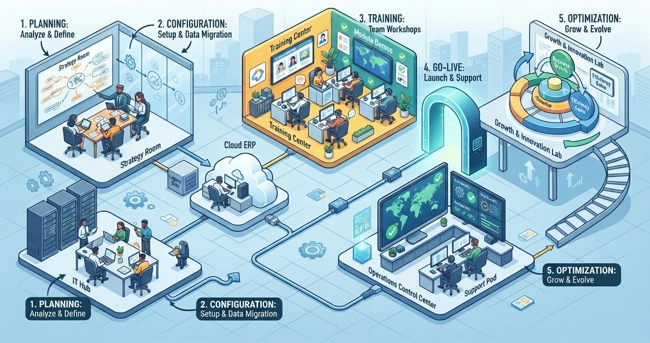
A successful implementation usually involves several connected stages rather than one installation appointment. The exact sequence depends on the business, the ERP platform, integrations, data volume, and project scope.
| Implementation stage | What happens |
|---|---|
| Business assessment | Current processes, problems, goals, and requirements are identified |
| System planning | ERP modules, workflows, integrations, users, and project scope are defined |
| Configuration | The ERP is configured around agreed business processes |
| Data preparation | Existing information is reviewed, cleaned, mapped, and prepared for migration |
| Integration | Relevant systems such as accounting, CRM, inventory, or e-commerce platforms are connected |
| Testing | Business workflows are tested before launch |
| Training | Employees learn how the system applies to their roles |
| Go-live | The new system becomes operational |
| Support and optimization | Issues are addressed and workflows are improved after launch |
These stages should not be treated as isolated tasks. For example, discovering a data problem during testing can require changes to the migration process. Similarly, a workflow identified during business assessment may affect configuration and integration decisions later in the project.
That is why implementation planning matters so much. ERP projects commonly involve business process changes, data migration, integration, testing, training, and post-launch stabilization.
Start With Business Processes, Not Software Features
One of the easiest mistakes to make is choosing an ERP based on the length of its feature list. More features do not necessarily mean a better solution for your company.
Before configuration begins, look at how work actually moves through the business. How does an order enter the company? Who approves purchases? Where is inventory updated? How does information reach accounting? How are customers tracked? How are reports produced? Where do employees have to copy information from one application to another?
These questions reveal where the real opportunities are.
For example, suppose a retailer enters a sale through a POS system, manually adjusts an inventory spreadsheet, and then sends information to accounting later. The problem is not simply that the company needs "better software." The problem is that sales, inventory, and accounting are disconnected.
An ERP implementation can address the underlying workflow by creating a more connected process. Praxis Blueprint's approach is built around this principle: understand how a business operates, identify inefficiencies, and implement technology that solves a genuine operational problem.
Data Migration Can Make or Break an ERP Project
Data migration is one of the less glamorous parts of an ERP implementation, but it can have a major impact on the project. Businesses often discover that their existing spreadsheets and databases contain duplicate customers, outdated products, inconsistent naming conventions, incomplete records, or information nobody uses anymore.
Moving all of that information into a new ERP without reviewing it first can simply transfer old problems into a new system.
Data should therefore be evaluated before migration. Determine what information is necessary, what needs to be corrected, what should be archived, and how records should be structured in the new system. Testing migrated data before go-live can also reveal problems before they affect daily operations.
For a small business, this is an excellent opportunity to clean up years of accumulated information rather than carrying unnecessary clutter into the next generation of business software.
ERP Integration With QuickBooks, CRM, and Other Business Tools
An ERP system does not necessarily need to replace every application a business already uses. In many cases, the better approach is to connect the systems that are important to daily operations.
For example, a company may want its ERP to work with QuickBooks, a CRM, an e-commerce platform, or an existing inventory system. Integration can reduce duplicate data entry and make information available where employees need it.
This is where ERP integration with QuickBooks and CRM platforms becomes particularly valuable. Instead of employees repeatedly transferring information between systems, integrations can allow relevant information to move between connected applications.
Praxis Blueprint specifically identifies system integration and automation as one of its core services, including connections involving QuickBooks, inventory, e-commerce, and CRM systems.
Employee Training and Adoption Matter as Much as Configuration
Even a well-designed ERP system can fail to deliver value if employees do not understand how to use it or why the company is changing its processes.
Training should be practical and role-specific. Employees do not necessarily need to understand every ERP module. A sales employee needs to understand the processes relevant to sales. Someone responsible for purchasing needs to understand purchasing workflows. Managers need to understand reporting and operational visibility.
It is also important to involve employees before the system goes live. The people who work with the existing processes every day often know where the problems are better than anyone else. Their feedback can identify unnecessary steps, exceptions, and practical concerns that might otherwise be missed.
Current ERP guidance consistently treats user adoption, training, and change management as core parts of implementation rather than optional activities added at the end.
How Much Does ERP Implementation Cost?
There is no single price for ERP implementation because the total investment depends on the software, number of users, integrations, amount of data, customization requirements, business complexity, training needs, and implementation support required.
A small business implementing a relatively straightforward cloud ERP with limited integrations will have different requirements from a multi-location company migrating several databases and connecting numerous applications.
Businesses should therefore look beyond the software subscription price. The total cost can include implementation consulting, configuration, data migration, integrations, training, support, cloud services, and internal employee time.
When comparing proposals, ask what is included in the implementation and what would be considered additional work. A clear scope can reduce unpleasant surprises later. Managing scope and considering total cost of ownership are recognized ERP implementation priorities.
How to Choose an ERP Implementation Partner
The implementation partner can be just as important as the ERP software itself. A technically capable provider should also understand business processes, communicate clearly, explain technical decisions in plain language, and be willing to tell you when a particular feature or customization is unnecessary.
Ask prospective partners how they approach requirements gathering, data migration, integrations, testing, training, support, and scope changes. You should also ask who will actually work on your project and what happens after the system goes live.
For a small business, accessibility matters. You should be able to get answers without feeling as though you need an IT degree to have a conversation with your technology partner.
Praxis Blueprint's brand philosophy is deliberately built around this idea: Be Kind, Be Authentic, and Be Useful. The company emphasizes meeting business owners where they are, making honest recommendations, and building systems that solve real operational problems.
Why Custom-Fit ERP Solutions Can Make Sense for Growing Businesses
Not every business needs a completely custom ERP built from scratch. In fact, unnecessary customization can increase implementation complexity and make future maintenance more difficult.
The better question is whether the ERP can be configured and integrated to support the processes that genuinely matter to your business.
A custom-fit approach does not necessarily mean reinventing the software. It means selecting an appropriate foundation, configuring workflows intelligently, connecting necessary systems, and customizing only where there is a clear business reason.
This approach supports Praxis Blueprint's positioning as a provider of practical business management solutions rather than bloated enterprise software. The company's ERP offering is designed around inventory management, purchasing, reporting, operational control, and workflow tailoring for small and mid-sized businesses.
What Happens After ERP Go-Live?
Going live is not the end of an ERP implementation. It is the point where the system begins operating in the real world.
Employees may encounter questions that did not appear during testing. A report may need adjustment. A workflow may need refinement. An integration may require additional attention. These are normal reasons to have a support and optimization plan.
The first few weeks after launch can be particularly valuable because employees are working with the system under real operating conditions. Their feedback can reveal opportunities to simplify processes, improve reporting, or automate repetitive work.
Over time, businesses can expand the role of the ERP as their needs change. This could include additional integrations, new reporting capabilities, additional locations, or more automated workflows.
Frequently Asked Questions About Small Business ERP Implementation
What are small business ERP software implementation services?
Small business ERP software implementation services help a company plan, configure, integrate, test, launch, and support an ERP system. The process typically includes requirements analysis, workflow planning, data migration, system configuration, integrations, employee training, testing, and post-launch support.
How long does an ERP implementation take for a small business?
There is no universal timeline. A straightforward implementation with limited integrations may be completed much faster than a complex project involving multiple locations, significant data migration, or extensive integrations. The most important factor is establishing a realistic scope before committing to a launch date.
Can a small business integrate ERP software with QuickBooks?
Yes, depending on the ERP and the required integration method. Businesses may connect accounting, CRM, inventory, e-commerce, and other systems so relevant information can move between applications instead of being entered manually. The specific integration capabilities should be evaluated during the planning stage.
Should a small business replace spreadsheets with ERP software?
Not necessarily every spreadsheet needs to disappear. The better question is whether spreadsheets are creating operational problems. If employees are maintaining critical information manually, duplicating data, struggling with reporting, or spending excessive time reconciling records, an ERP assessment may be worthwhile.
Is cloud ERP a good option for entrepreneurs?
Cloud-based ERP can be attractive to growing businesses because it can provide access to business systems without requiring the company to maintain all of the underlying infrastructure itself. However, the right deployment model depends on the company's requirements, integrations, security considerations, budget, and operational needs.
What should I look for in an ERP implementation company?
Look for a provider that understands your business processes, communicates clearly, has experience with integrations and data migration, provides training and support, establishes a realistic scope, and focuses on measurable business outcomes rather than simply installing software.
Building a Business System That Grows With You
An ERP implementation should ultimately make running the business easier, not create another layer of complexity. The most valuable system is one that employees can understand, managers can rely on, and the business can continue to use as it grows.
For small and mid-sized businesses, that means starting with real operational needs, cleaning up data, connecting important systems, training employees, testing workflows, and keeping the project within a realistic scope. It also means having a technology partner willing to focus on what is useful instead of automatically recommending the most complicated solution available.
Praxis Blueprint was created around that philosophy. As the business management solutions division of Praxis Holdings, the company provides ERP, CMS, POS, system integration, automation, and business process consulting designed around how businesses actually operate.
If your business is spending too much time managing spreadsheets, transferring information between applications, reconciling reports, or working around disconnected systems, the next step does not have to be complicated. A practical assessment of your current processes can show where technology can remove friction and give your team better visibility.
Systems That Work. Business That Flows.